Google Chrome's New 'Skills' Turn Your Best AI Prompts Into One-Click Browser Tools
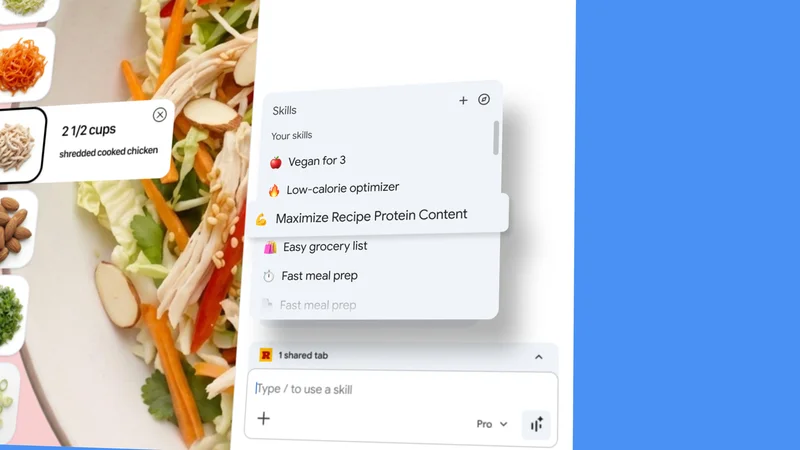
Image: Google AI Blog
Main Takeaway
Chrome now lets users save any Gemini prompt as reusable 'Skills' that work across sites. Like browser macros for AI.
Summary
What Skills actually are
Skills are reusable AI prompts you pin inside Chrome. Save any question you ask Gemini, give it a name, then trigger it again with one keystroke across any tab. No more copy-pasting the same "summarize this" or "convert to vegan" queries.
Google seeded the tool with 50+ starter Skills: protein-maxing recipe tweaks, YouTube video summaries, side-by-side product comparisons pulled from multiple tabs, and quick fact checks. Each is editable; you can remix wording or swap in new variables before you run it again.
The whole thing lives in the Gemini sidebar. Type @Skills or hit Ctrl/Cmd + . to open the library, pick a Skill, and watch it execute on whatever page you're viewing. Think browser macros, but the macro is a prompt instead of clicking buttons.
How to set up your first Skill
Open Chrome desktop (English rollout started April 14; other languages and mobile are "coming weeks"). Click the Gemini sparkle in the top-right or press Ctrl/Cmd + . to open the sidebar.
Choose an existing Skill from the library to see the format. Want your own? Ask Gemini something useful, then click the bookmark-like icon that appears above the response. Name the Skill, add a one-line description, and assign a shortcut if you like.
From then on, highlight text on any page or just hit your shortcut. Chrome injects the Skill prompt plus any selected text into Gemini and returns the answer in the sidebar. You can stack multiple Skills on the same page or run one Skill across a dozen tabs in seconds.
Why this matters for power users
The friction of repeating AI prompts has been the biggest barrier to using chatbots for real work. Skills sand that friction down to a single click. Recipe developers testing 30 vegan blogs can now batch-apply the same substitution prompt. Research teams can auto-summarize every PDF in a tab stack.
Early testers told Google they use Skills for price-watching, legal document scanning, and even generating alt-text for social images. Because Skills run inside the browser, they inherit context like cookies and login state. That lets them do things standalone chatbots can't, such as pulling personalized data from your logged-in bank or shopping cart.
For Chrome, it's also a stickiness play. Once your muscle memory locks onto @Skills, switching browsers means rebuilding your prompt library. Google knows this and lets you export Skills as JSON files, but the hassle factor still favors staying put.
What this means for developers
Google hasn't opened a public Skill store yet, but the JSON export hints at a marketplace. Developers could ship Skills that bundle prompts, CSS selectors, and even light scripting to automate workflows across SaaS apps.
Imagine a Skill that logs into Stripe, pulls last month's revenue, and drops a formatted chart into Google Sheets. Or one that crawls a competitor's pricing page nightly and pings Slack when prices change. Chrome already has enterprise policy controls; admins could push approved Skills to thousands of seats like extensions.
For now, Google only surfaces your own and its starter set. Still, the underlying API looks extensible. Watch for third-party Skills to appear in the Chrome Web Store once Google flips the switch.
Privacy and control trade-offs
Skills run inside the Gemini sidebar, so Google sees every page you execute them on. The company says prompts and page content are processed under the same Gemini privacy policy that already covers Chrome's AI features. Data stays encrypted in transit and isn't used to train Google's models unless you opt in.
Enterprise users get extra knobs. Admins can disable Skills entirely, restrict them to approved domains, or route prompts through a private Gemini endpoint. Consumer users can turn the whole thing off under Settings > Privacy > AI features, but there's no granular per-Skill toggle yet.
If you're privacy-conscious, treat Skills like browser extensions: useful, but audit what data each prompt sends. The export-to-JSON option at least lets you self-host and version-control your favorites.
What happens next
Google's roadmap leaked by testers shows three phases. Phase one (now) is desktop English. Phase two adds mobile and multilingual support by mid-May. Phase three, slated for summer, introduces shared Skill links and a community gallery.
The gallery could evolve into Google's answer to OpenAI's GPT Store. Expect monetization: paid Skills, usage analytics for creators, and enterprise bundles. Mozilla and Microsoft have already copied Chrome's AI sidebar; they'll likely ship similar prompt-reuse features within months.
For users, the next step is simple: open Chrome, hit Ctrl/Cmd + ., and start building your own library. The more you use the web, the more Skills you'll invent. And once you have twenty or thirty, switching browsers will feel like leaving a perfectly organized toolbox behind.
Key Points
Chrome Skills let you save any Gemini prompt as a reusable one-click tool across all tabs.
50+ starter Skills cover recipes, summaries, comparisons; all are editable and exportable as JSON.
Early users apply Skills to price tracking, document scanning, and batch content tasks that leverage browser login state.
Enterprise admins can disable or whitelist Skills; consumer toggle lives under Privacy settings.
Future roadmap includes mobile support, multilingual rollout, and a shared Skills gallery that could rival the GPT Store.
FAQs
Not yet. The April 14 rollout is desktop-only in English. Google says mobile and additional languages arrive "in the coming weeks."
Right now you can only export them as JSON files. A shareable link feature is planned for the summer gallery launch.
Yes, for now. All Skills use your existing Gemini quota. Google hasn’t announced paid Skills, but the gallery roadmap suggests monetization is coming.
Go to Settings > Privacy > AI features and toggle off "Skills." Enterprise admins can block the feature entirely via policy.
Yes. The prompt plus page content are processed under Gemini’s existing privacy policy. You can opt out of training data use, but the prompt still hits Google servers.
Source Reliability
57% of sources are highly trusted · Avg reliability: 72
Go deeper with Organic Intel
Our AI for Your Work systems give you practical, step-by-step guides based on stories like this.
Explore ai for your work systems